
Arıza Kodları
OBD2 Diyagnostik Hata Kodu
- 1 Diyagnostik Arıza Kodları Nasıl Okunur?
- 2 Diyagnostik Hata Kodları Nelerdir?
- 2.1 Hata Kodlarındaki İlk Hanenin Anlamı Nedir?
- 2.2 Hata Kodlarındaki İkinci Hanenin Anlamı Nedir?
- 2.3 Hata Kodlarındaki Üçüncü Hanenin Anlamı Nedir?
- 2.4 Hata Kodlarındaki Dördüncü Ve Beşinci Hanenin Anlamı Nedir?
- 3 Arıza Kodları Listesi: Kodların Anlamları, Neden Ortaya Çıkmaktadır, Belirteli Ve Çözümleri Nelerdir?
- 4 Hangi Arıza Kodları Kaydedilmektedir?
- 5 Elektronik Kontrol Ünitelerinin Çalışma Mantığı Nasıldır?
- 6 OBD2 Tarayıcı Nedir?
- 6.1 OBD2 Bölücü Nedir?
- 7 Bir Uygulama Aracılığıyla OBD2'den Veri Nasıl Alınır?
- 8 Arıza Kodlarını Neden Düzenli Olarak Okumalıyız?
- 9 Arıza Kodları Nasıl Silinir?
- 10 Bir OBD2 Tarayıcı Kullanarak Servis Işığı Silinebilir Mi?
- 11 Nitro Smart İle Başka Neler Yapabilirsiniz?
- 11.1 Kodlama Fonksiyonu
- 11.2 Arıza Teşhisi
- 11.3 Ek Bakım Hizmetleri Fonksiyonu
- 11.4 2. El Araba Kontrolü
- 11.5 Dijital Garaj Fonksiyonu
OBDTALK EVRENSEL
TARAYICI
- iOS ve Android Etkin
- Tüm araba markaları desteklenir
- Tarayıcıda 14 günlük para iade garantisi
- Premium müşteri desteği ile ömür boyu garanti
Diyagnostik Arıza Kodları Nasıl Okunur?
Günümüzdeki arabaları, tıpkı bilgisayarlar gibi düşünebiliriz. Bu nedenle arabalarda da, tıpkı bilgisayarlar gibi arızalanabilir. Günümüzdeki arabalarla, araçtaki elektronik parçaları düzenleyen ve bu parçaları yöneten 80′ e yakı n kontrol ünitesi bulunmaktadır. Araçta herhangi bir arıza meydana geldiğinde, bunlar OBD2 arıza kodları şeklinde saklanır ve bu kodları okuyarak aracınızdaki arızayı anlayabilirsiniz.
Aracınızda arıza teşhisi yapmanın bir kaç yolu bulunmaktadır. Bunlardan birisi, aracın bir tamir garajına götürülüp, burada teknisyenler tarafından arıza kodlanırın okunmasıdır. Ancak daha hızlı ve pratik bir seçenekte vardır! Arıza kodlarını kendiniz okuyabilirsiniz. Bunun için ise, bir OBD2 tarayıcıya ve bu tarayıcıyla uyumlu çalışan bir yazılıma ihtiyacınız bulunmaktadır.
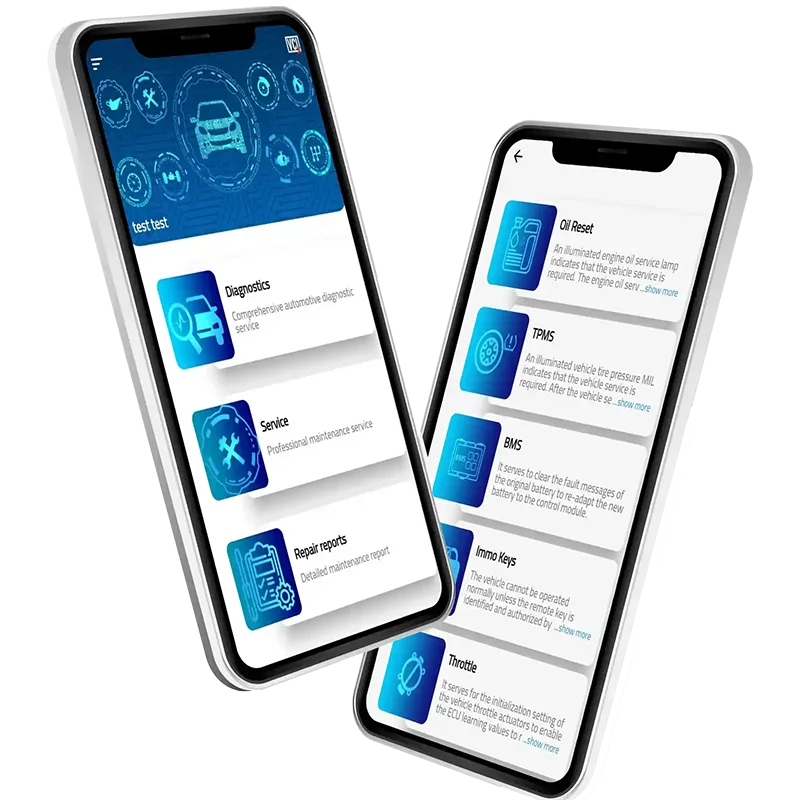
Eğer NitroSmart tarayıcı cihaza sahipseniz tek yapmanız gereken tarayıcıyı OBD2 soketinden takıp, uygulamayı açmaktır. Telefon uygulaması ile arıza teşhisi özelliğini çalıştırdıktan sonra, tüm hata kodlarını görebilirsiniz.
Bunların yanında, NitroSmart tarayıcı sayesinde aracınız hakkınad daha fazla bilgi edineceksiniz. Araç modeilnize göre kodlama yapabilecek ve aracınıza bakım yapabileceksiniz.
Öncelikle arıza kodlarını okuyarak, aracınızı daha iyi anlayacaksınız. Sizlere arıza kodlarının ne olduğunu, arıza kodlarını okumayı ve bunları en iyi şekilde nasıl yapacağınızı göstereceğiz. Tüm bunlar sayesinde kendi kendinizin tamircisi olacaksınız.
Diyagnostik Hata Kodları Nelerdir?
Araçta kimi zaman problemler meydana gelebilmektedir. Çoğunlukla, kontrol üniteleri bu arızaları kendi başına düzeltebilmektedir. Her arıza, DTC( diyagnostik hata kodu) olarak kaydedilmektedir.
Kontrol ünitelerinin çözemediği sorunlar, gösterge panelinde gözükmektedir. Gösterge panelinde yanıp sönen arıza ışıkları, ciddi bir arızanın habercisi olabilir. Bu gibi durumlarda, aracın daha fazla hasar görmemesi için, motor hemen kapatılmalıdır.
Farklı türlerde hata kodları vardır, ve bunların çoğu aynı mantığa sahiptir. Hata kodlarındaki her bir rakam, farklı anlamlara sahiptir. Yaklaşık 10000 adet kod bulunmaktadır ve bu kodlar SAE J2012 ve ISO 15031-6 standartlarına göre düzenlenmiştir.
Hata Kodlarındaki İlk Hanenin Anlamı Nedir?
Hata kodlarındaki ilk hane, hatanın geldiği bölgeyi belirtmektedir. Aşağıdaki harfler, bölgeleri belirtmektedir.
- P(güç aktarma organları): Motor ve Şanzıman
- C (Şasi) = Şasi
- B (Gövde) = Gövde
- U (Kullanıcı Ağı) = Ağ
Hata Kodlarındaki İkinci Hanenin Anlamı Nedir?
İkinci hane, bunun standart bir kod mu yoksa üreticiye özel bir kod mu olup olmadığını söylemektedir.
- 0 = Standart kod
- 1 = Üreticiye özel kod
Hata Kodlarındaki Üçüncü Hanenin Anlamı Nedir?
Hata kodlarındaki üçüncü basamak, bu kodla ilgili alt sistemleri gösterir.
- 0, 1 ve 2: hava ve yakıt ölçüm kontrolü
- 3: Ateşleme sistemi
- 4: Ek emisyon kontrolü
- 5: Engine idle control 5: Motor rölanti kontrolü
- 6: Yerleşik bilgisayar ve yardımcı çıkışlar
- 7, 8 ve 9: İletim kontrol sistemi
- A, B ve C: Hibrit sürücü
Hata Kodlarındaki Dördüncü Ve Beşinci Hanenin Anlamı Nedir?
Hata kodlarının dördüncü ve beşinci basamağı, size gerçek hatayı göstermektedir. Uygulama, tüm hata kodlarını sizlere detaylı bir şekilde gösterecektir.
Hatayı anladıktan sonra kodlayıp çözebilirsiniz.
Teşhis Hata Kodları Listesi: Hata Kodlarının Anlamları, Nedenleri, Belirtileri ve Düzeltme Yöntemleri.
Üreticiye özel bir hata kodunuz varsa, yalnızca uzman mağazalar ve uygulamalar size yardımcı olabilir. Hata kodları örnekleri ve sizin için anlamları.
En çok karşılaşılan 10 OBD2 arıza kodu
- P0420
Bu kod, katalitik konvertörün verimliliği ile ilgili bir sorun olduğunu gösterir.
- P0430
Bu kod, katalitik konvertörde bir sorun olduğunu, özellikle egzoz gazlarını daha az zararlı emisyonlara doğru uygun şekilde dönüştüremediğini gösterir.
- P0299
Bu kod, turboşarj veya süperşarj sisteminde bir sorun olduğunu, özellikle turboşarj veya süperşarj alt besleme koşulunun algılandığını gösterir.
- P0335
Bu kod, krank mili konum sensörü devresinde bir sorun olduğunu, özellikle sensörden ECM'ye gönderilen sinyalin beklenen aralığın dışında olduğunu gösterir.
- P0700
Bu kod, şanzıman kontrol sisteminde bir sorun olduğunu, özellikle TCM'nin bir hatayı algıladığını ve arıza lambasını yakmış olduğunu gösterir.
- P0135
Bu kod, oksijen sensörü devresinde bir sorun olduğunu, özellikle sensörden ECM'ye gönderilen sinyalin beklenen aralığın dışında olduğunu gösterir.
- P0102
Bu kod, kütle hava akışı (MAF) sensörü devresinde bir sorun olduğunu, özellikle sensörden ECM'ye gönderilen sinyalin beklenen aralığın dışında olduğunu gösterir.
- P0401
Bu kod, egzoz gazı geri kazanım (EGR) sisteminde bir sorun olduğunu, özellikle yetersiz akışın algılandığını gösterir.
- P0171
Bu kod, yakıt sisteminde bir sorun olduğunu, özellikle karışımda çok fazla hava ve yeterince yakıt olmaması nedeniyle sistemde zayıf çalıştığını gösterir.
- P0101
Bu kod, kütle hava akışı (MAF) sensörü devresinde bir sorun olduğunu, özellikle sensörden ECM'ye gönderilen sinyalin aralığının dışında olduğunu gösterir.
Diğer genel OBD2 arıza kodları
- P0442
This code indicates that there is a small leak in the vehicle's evaporative emission control system, which is responsible for reducing the amount of fuel vapors released into the atmosphere.
Hangi Arıza Kodları Kaydedilmektedir?
Arızalar, aracınızdaki farklı bölümlerde, bir defa veya birden çok kez meydana gelebilir. Kontrol üniteleri bu arızaları kendi onarabilir, eğer kendi onarırsa, sürücü uyarılmaz, arıza hafızaya kaydedilir. Ancak bazı hatalar kontrol üniteleri tarafından onarılmaz, manuel olarak müdahale gerekir.
Bu arızalara bir örnek verecek olursak, bu yağ seviyesi olabilir. Yağ seviyesi belirli bir seviyenin altına düştüğünde sürücü uyarılır ve hata hafızaya kaydedilir. Fren hidroliği ve silecek suyu da aynı mantığa sahiptir.
Bunlara ek olarak bazı arızalarda sürücü hemen uyarılmaz, ancak bunlar en nihayetinde ele alınması gereken daha karmaşık arızalardır. Örnek vermek gerekirse araçtaki elektronik sistem, yüksek sıcaklık seviyesi, nem, aşınmalar, gibi güçlü etkenlerden dolayı ciddi arızalar yaşanır, bundan dolayı da parça değişimleri gerekebilir.
Aracınızın sağlık durumu hakkında düzenli bilgiye sahip olabilmek için, araçtaki hataları düzenli olarak okumanız gerekmektedir. Nitro Smart tarayıcı sayesinde, araçtaki arızaları okuyabilir, aracınızın durumunu sürekli olarak takip edebilirsiniz.
Kendi OBD2 okuyucunuza sahip olduğunuzda, sürekli tamircilere ödeme yapmak zorunda kalmayacaksınız.
Nitro Smart sayesinde, arıza kodu okuma ve silmenin haricinde aracınız üzerindeki kontrolünüz de artar.
Elektronik Kontrol Ünitelerinin Çalışma Mantığı Nasıldır?
ECU’ları içlerinde mikroişlemciler bulunan bilgisayarlar gibi düşünebiliriz. Araçtaki tüm elektronik sistemlerin kontrolünü sağlamaklar görevlidirler. Sensörler aracılığıyla, kontrol ünitelerine bilgi aktarılır. Gelen değer karşılaştırılır. Eğer bir sapma varsa, kontrol ünitesi gereken önlemi alır.
Her durum için farklı arıza kodları bulunur. Kontrol ünitesinin arızayı kendi düzeltemediği durumlarda sürücü ikaz ışıklarıyla uyarılır. Tüm ECU’lar CAN veri yoluna sahiptir, bundan dolayı, tarayıcılar OBD2 üzerinden tüm verileri alır.
OBD2 Tarayıcı Nedir?
OBD2 tarayıcı sayeinde araç içi iletişime erişebilirsiniz. NitroSmart OBD tarayıcısı ile birlikte, arabanız ve bir mobil uygulama arasında bağlantı kurup, verilerinize erişebilirsiniz.
OBD2 Bölücü Nedir?
Bu ayırıcı, bir obd soketini, iki adet OBD soketine çevirmeye yarar, böylelikle 2 obd soketi üzerinden bağlantı yapabilirsiniz.
Bir Uygulama Aracılığıyla OBD2'den Veri Nasıl Alınır?
Eğer kullanacağınız uygulama, Nitro Smart uygulamasıysa, araçtan veri almak çok basittir. Öncelikle bir Nitro Smart tarayıcı almanız gerekmektedir. Bir sonraki adım ise cihazı OBD soketine bağlamaktır. Uygulama, bluetooth aracılığıyla Nitro Smart OBD tarayıcısına bağlanır ve aracınızdan veri elde edersiniz.
Hata kodlarını okuyup silmek oldukça basittir, bunlar için 4 adım vardır;
- İlk olarak Nitro Smart OBD tarayıcıyı sipariş edin.
- Daha sonra App Store veya Google Play aracılığıyla mobil uygulamamızı indirin.
- Tarayıcınızı aracınızın OBD soketine bağlayın.
- Ve en son adım da Nitro Smart uygulamasını açın(uygulama araca otomatik olarak bağlanır.)
Hata kodlarını dakikalar içerisinde okuyup işleyebilirsiniz. Ancak bazı durumlarda okumak 20 dakikayı bulabilir.
Bir tarama işlemini yaptıktan sonra verilerin eski ve yeniliğini görmek istiyorsanız, araçtaki arıza hafızasını silmeniz gerekmektedir. Belleği sildikten verileri tekrardan okuyabilirsiniz. Nitro Smart uygulamasının ücretsiz sürümü ile birlikte standart OBD kodlarına erişebilirsiniz. Ancak üst düzey işlevlere erişmek istiyorsanız tek bir marka için veya tüm markalar için lisans aktif ettirebilirsiniz.
Arıza Kodlarını Neden Düzenli Olarak Okumalıyız?
Arıza kodlarını okumak, araçta ciddi bir arıza olmaması için, arızaya önceden erişmek anlamında önemlidir. Eğer hata sürekli görünüyorsa, muhtemelen sistemde bir hata vardır.
Araçta oluşan arızalar birbiriyle bağlantılıdır. Örneğin Lambda sensöründe (yanma havasının yakıta doğru oranını ölçmekten sorumlu sensör) bir arıza varsa, bu daha sonradan yüksek yakıt tüketimine ve fazla emisyon değerlerine neden olabilir. Lambda ile ilgili arıza alırsanız, kütle hava akışı sensörüyle ilgili de arıza yaşarsınız. Bu durumda lambda sensörünün iyi çalıştığını düşünebiliriz, ancak korozyonda bir sızıntı da olabilir. Bu sızıntıyı onarmak, lambda sensörünü değişmekten daha az maliyetlidir.
Arıza Kodları Nasıl Silinir?
Arıza kodlarını okuyup, arızaları düzeltip silebilirsiniz.
Genellikle arızalar kendiliğinden de silinebildiğinden, düzeltmeden de silme işlemini yapabilirsiniz. Birçok hata ECU hafızasından belirli aralıklarla silinir. Ancak iletişim hataları vb. kaynaklardan dolayı otomatik olarak silinmez. Bu durumda manuel olarak silmek gerekir. Eğer daha önce sildiğiniz bir hata, daha sonralarda tekrardan karşınıza çıkıyorsa, durum ciddi olabilir, bu durumlarda arızayı daha detaylı bir şekilde incelemek gerekir.
Motor hataları ile hemen ilgilenilmelidir ancak medya hataları aracı çok etkilemeyeceğinden araca kısa sürede etki göstermez.
Bir OBD2 Tarayıcı Kullanarak Servis Işığı Silinebilir Mi?
Yağ bakım zamanı geldiğinde, araç servis hatırlatıcı ile uyarılır ve bu da oldukça sıkıcı bir durumdur. Bu araç hafızasında saklanmaz, bu nedenle de teşhis sırasında okunmaz.
Ancak Nitro Smart’ın servis işlevini kullanarak, servis sıfırlama işlemlerini yapabilir ve aracınızda kayıtlı bakım verilerini görebilirsiniz. Böylelikle bakımları kendiniz yapabilir, zamandan ve paradan tasarruf edersiniz.
Bu özelliğin kullanımı araçtan araca değişmektedir. Öncelikle bu özelliğin aracınızla uyumlu olup olmadığını kontrol etmeniz gerekmektedir.
Nitro Smart İle Başka Neler Yapabilirsiniz?
Nitro Smart, sizlere yalnız DTC okumayı değil, başka özellikleri de sunmaktadır.
Aşağıda bu özelliklerden birkaçını göreceksiniz. Bu özellikler aracınızın marka ve modeline bağlı olarak değişiklik göstermektedir.
Kodlama Fonksiyonu
Günümüzdeki araçlar 80 kadar kontrol ünitesine sahiptir, bu da bu araçları adeta bir bilgisayar gibi düşünmemizi sağlıyor. Nitro Smart sayesinde, bu kontrol ünitelerinde konfigürasyonlar yaparak aracınızı özelleştirebilirsiniz.
Örnek verecek olursak, ekrandaki logolar değişebilir, start stop devre dışı bırakılabilir, aracınızı açtığınızda veya kapadığınızda karşılama sinyallerini aktif hale getirebilirsiniz.
Araç Teşhisi
Arıza kodlarını okumak, Nitro Smart ile yapabileceklerinizin yalnızca küçük bir parçasıdır. Nitro Smart arıza kodlarını okumanın yanı sıra, sizlere üretici seviyesinde tanılama işlemi yapmanıza da imkan tanır.
Nitro Smart ile birlikte arıza kodlarını okuduktan sonra uygulama size arızanın detaylarını ve arızayı gidermek için detaylı bir kılavuz gösterir. Uygulama son derece kullanıcı dostudur, bu işle alakası olmayan kişiler dahi bu uygulamayı rahatlıkla kullanabilmektedir.
Ek Bakım Hizmetleri Fonksiyonu
Nitro Smart diğer bakım hizmetlerinde de sizlere imkan sunar. Örnek verecek olursak, akü kaydı yapabilirsiniz, elektronik park freni ayarlarınızı yapabilirsiniz.
Diğer bir örnek ise DPF resetleme işlemidir. DPF hakkındaki verileri takip edebilir, gerektiğinde DPF rejenerasyonu işlemini yapabilirsiniz. Otomatik şanzımanlı araçlarda öğrenme değerleri de Nitro Smart ile sıfırlanabilir. Özellikle 2. el araç aldıktan sonra bu işlemi yaparsanız, araç şanzımanı, sürüşünüze göre kendini adapte eder.
2. El Araba Kontrolü
2. el araçların fiyatını yüksek tutmak için, en az yüzde 30’unun kilometre ayarları ile oynanmıştır. Ancak düzenlenen kilometre yalnızca takoda gözükür. Kontrol ünitelerinde ise orijinal kilometre saklıdır. Nitro Smart ile birlikte araçtaki kontrol ünitelerine erişim sağlayarak, aracın orijinal kilometresini öğrenebilirsiniz.
Dijital Garaj Fonksiyonu
Nitro Smart tüm verilerinizi toplar ve bulutta saklar. Böylelikle verilerinizi daha fazla analiz için kullanabilirsiniz.
Artık Nitro Smart OBD2 tarayıcı ile birlikte aracınızın sağlığını kontrolünüz altında tutabilir, kendi aracınızın tamircisi olabilirsiniz.